
Overview
sbt-lwm (Light Weight Markup) is an SBT plugin that converts lightweight markup documents to HTML. It currently supports Textile and Markdown.
sbt-lwm uses the MarkWrap library to convert the markup to HTML, so it supports converting:
- Markdown, via the PegDown parser.
- Textile, via the FuseSource WikiText fork of the Eclipse Mylyn wikitext parser API.
- Plain text, wrapped in
<pre>and</pre>tags and surrounded by HTML goodness.
Using the Plugin
Getting the Plugin
Within your SBT project, create project/plugins.sbt (if it
doesn’t already exist) and add the following:
addSbtPlugin("org.clapper" % "sbt-lwm" % "1.0.0")
The plugin is cross-built for both SBT 0.13.x and 1.0.x.
Settings and Tasks
The plugin provides the following settings and tasks.
Note: sbt-lwm uses predefined SBT settings, where possible (e.g.,
sources). Of course, that’s not always possible. To be sure you’re updating
the correct setting, always use the form:
settingName in LWM
For instance:
flatten in LWM := false

sources in LWM ++= (baseDirectory.value / "src" * "*.txt").get ++
                   (baseDirectory.value / "src" * "*.md").get ++
                   (baseDirectory.value / "src" * "*.textile").get

targetDirectory in LWM := baseDirectory.value / "target"

cssFile in LWM := Some(baseDirectory.value / "src" / "style.css")
You can find the list of settings and tasks below.
Settings
sources
The lightweight markup files to be processed. sbt-lwm uses a file’s extension to recognize what kind of lightweight markup the file contains. The supported extensions are:
.md,.markdown: Markdown.textile: Textile.txt,.text,.cfg,.conf,.properties: Plain text, wrapped in a<pre>block.
For instance, suppose you want to process all Markdown files within your
“src” tree. You might set sources like this:
sources in LWM ++= (baseDirectory.value / "src" * "*.md").get
If you also want to apply the edits to all files ending in “.markdown” (perhaps because you’re not consistent in your extensions), use either:
sources in LWM ++= (baseDirectory.value / "src" * "*.md").get
sources in LWM ++= (baseDirectory.value / "src" * "*.markdown").get
or, more succinctly:
sources in LWM ++= (baseDirectory.value / "src" * "*.markdown").get ++
                   (baseDirectory.value / "src" * "*.md").get ++
Front Matter
Each source file can optionally start with front matter, metadata about the document. The front matter must be separated from the rest of the document by a single line like this:
%%%
Front matter consists of one or more item: value pairs. Currently, the only supported item is title. To set an individual title for a document, specify the title in the front matter, like so:
title: A very cool user's guide
%%%

# My User's Guide
If the title element is omitted, or if the front-matter is missing, then
the resulting <title> HTML element will be empty.
cssFile
A cascading style sheet (CSS) file to include, inline, in the <head>
section of the HTML document(s). This setting is a Scala Option pointing
to a file. By default, no CSS file is included in the generated HTML.
Example:
cssFile in LWM := Some(baseDirectory.value / "src" / "style.css")
targetDirectory
The directory to which to write the HTML versions of the source files. For example:
targetDirectory in LWM := baseDirectory.value / "target"
See also flatten, below.
flatten
If flatten is true, then the processed HTML files will all be placed
directly in targetDirectory; if there are name clashes, then some files
will be overwritten. If flatten is false, then the partial path to each
source file is preserved in the target directory.
An example will help clarify. Consider the following file tree:
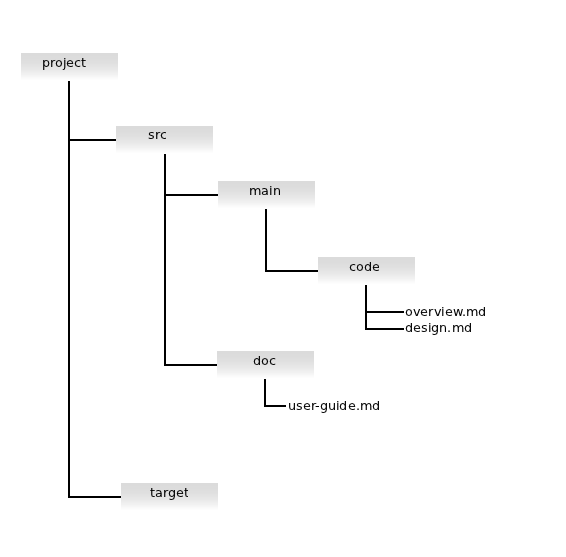
Let’s assume you’re processing all the files ending in “.md”, into the target directory.
sources in LWM ++= (baseDirectory.value / "src" * "*.md").get
targetDirectory in LWM := baseDirectory.value / "target"
With
flatten in LWM := false
LWM will generate the following files:
target/src/main/code/overview.htmltarget/src/main/code/design.htmltarget/src/doc/user-guide.html
However, if you set:
flatten in LWM := true
LWM will put all the HTML versions of all three files directly in the target directory.
target/overview.htmltarget/design.htmltarget/user-guide.html
encoding
The encoding of the source file and, hence, the resulting HTML. Defaults to “UTF-8”.
e.g.:
encoding in LWM := "ISO-8859_1"
Tasks
sbt-lwm provides two new SBT tasks.
-
lwm:translatetranslates the files specified bysourcesto HTML. -
lwm:cleandeletes all generated HTML files.lwm:cleanis also automatically linked into the main SBTcleantask.
Hooking LWM into the compile phase
If you want the run lwm:transate every time you run compile, just
add this line to your build.sbt:
compile in Compile := ((compile in Compile) dependsOn (translate in LWM)).value
Change log
The change log for all releases is here.
Author
Brian M. Clapper, bmc@clapper.org
Copyright and License
This software is copyright © 2011-2018 Brian M. Clapper and is released under a BSD License.
Patches
I gladly accept patches from their original authors. Feel free to email patches to me or to fork the GitHub repository and send me a pull request. Along with any patch you send:
- Please state that the patch is your original work.
- Please indicate that you license the work to the sbt-lwm project under a BSD License.